
Two GFCI receptacles can look almost identical in a quotation and still differ in current rating, feed-through capability, terminal method, environmental suitability, self-test behavior, certification identity, or packaging configuration. Those differences may not become visible until a sample is wired, an inspector checks the markings, or a distributor receives the wrong variant.
A GFCI specification sheet helps buyers screen products, but it should never be treated as the complete approval record. The safest procurement decision comes from matching the datasheet to the current certification record, installation instructions, physical sample, packaging artwork, and purchase order.
How this draft was prepared: AI-assisted research was used to organize the official UL Solutions, OSHA, CPSC, GS1 and manufacturer materials cited below. This draft does not claim a field inspection, licensed design review, certification decision, or approval by an authority having jurisdiction. A verified author or technical reviewer must be assigned before publication.

Illustrative editorial image. It does not show a Faith Electric production line, certificate, customer order, or approved product.
Start with four documents, not one
Before reading individual fields, separate four documents that are often bundled together in a sales email:
| Document | What it should tell you | What it cannot prove by itself |
|---|---|---|
| Product specification sheet | Model, ratings, dimensions, features, materials, terminals and options | That the quoted model is currently certified or identical to the production unit |
| Certification database record | Company, file or listing identity, product category, model coverage, ratings and conditions shown by the certification body | That every statement in a supplier’s brochure is correct or that the product suits your exact installation |
| Installation instructions | Wiring method, LINE/LOAD identification, conductor limits, torque, testing and warnings | That the factory will ship the exact approved model, color, label and package |
| Approved sample and purchase documents | The physical configuration, artwork, accessories, carton quantity and commercial requirements | That an unverified certification claim is valid |
Keep the latest controlled version of each. A PDF named “final” is not revision control. Record the document number, revision, issue date, applicable model numbers, approver and approval date. If a supplier changes one document, ask which other controlled records must also change.
UL Solutions’ certification database can be searched by model, file number, company information and product category. OSHA also explains that a product is properly certified only when the certification is within the recognized laboratory’s scope, is issued from a recognized site, and bears that laboratory’s registered certification mark. There is no single generic “NRTL approved” logo.
Read the model identity before the electrical ratings
The first line to verify is the exact catalog or model number. Do not approve a family name such as “20A self-test GFCI” if the order, certification record and sample use different suffixes.
A suffix may identify a material difference, including:
- 15 A versus 20 A configuration;
- white, ivory, black or another color;
- tamper-resistant or standard shutters;
- weather-resistant construction;
- indicator-light behavior;
- hospital-grade or other special construction;
- single pack, contractor pack or private-label package;
- manufacturer-branded versus multiple-listed identity.
Ask the supplier for a model matrix that decodes every character used in the quoted SKU. Then highlight the exact row being ordered. If the datasheet covers a family, the selected options should be unambiguous.
For a private-label program, match the buyer-facing model to the applicable listing path and approved markings. Faith’s private-label GFCI checklist explains why the device, box, instructions and certification identity need to be approved as one set.
Check ratings in a fixed order
Reading ratings in the same sequence on every quote makes omissions easier to spot.
1. Device type and protection function
Confirm whether the product is a receptacle GFCI, blank-face GFCI, portable GFCI, cord-connected protective device, or circuit breaker. A TEST and RESET button alone does not establish the device type or applicable product standard.
UL 943 covers several categories of Class A ground-fault circuit interrupters intended for personnel protection, including receptacle, portable and circuit-breaker types. The current edition and revision status should be checked in the official standard record rather than copied from an old brochure.
2. Voltage, frequency and current rating
Record the rated voltage, frequency and amperage exactly as shown for the model. Do not assume that a 20 A feed-through claim means the face configuration is also 20 A. A familiar U.S. duplex face can still represent a different rating or configuration than the buyer intended.
Where a NEMA configuration is specified, compare the face pattern and catalog description with the approved sample. If the project uses a nonstandard supply, higher-frequency equipment or a different market, ask for written confirmation of the applicable rating and certification scope.
3. Feed-through protection
If downstream receptacles will be protected from the LOAD terminals, the specification should identify feed-through capability and its rating. The installation instructions must also explain the approved LINE and LOAD connections. A buyer should not infer downstream protection merely because load terminals are physically present.
4. Environmental and construction attributes
Tamper-resistant (TR) and weather-resistant (WR) are separate attributes. One does not imply the other, and GFCI protection does not make a receptacle waterproof. If the application requires TR, WR, hospital-grade construction, a particular face material, or a specific operating-temperature range, write each requirement into the comparison sheet and purchase order.
Terminal details determine whether the product fits the job
Terminal information is often reduced to “screw terminal” or “back wire,” which is not enough for installers or project estimators.
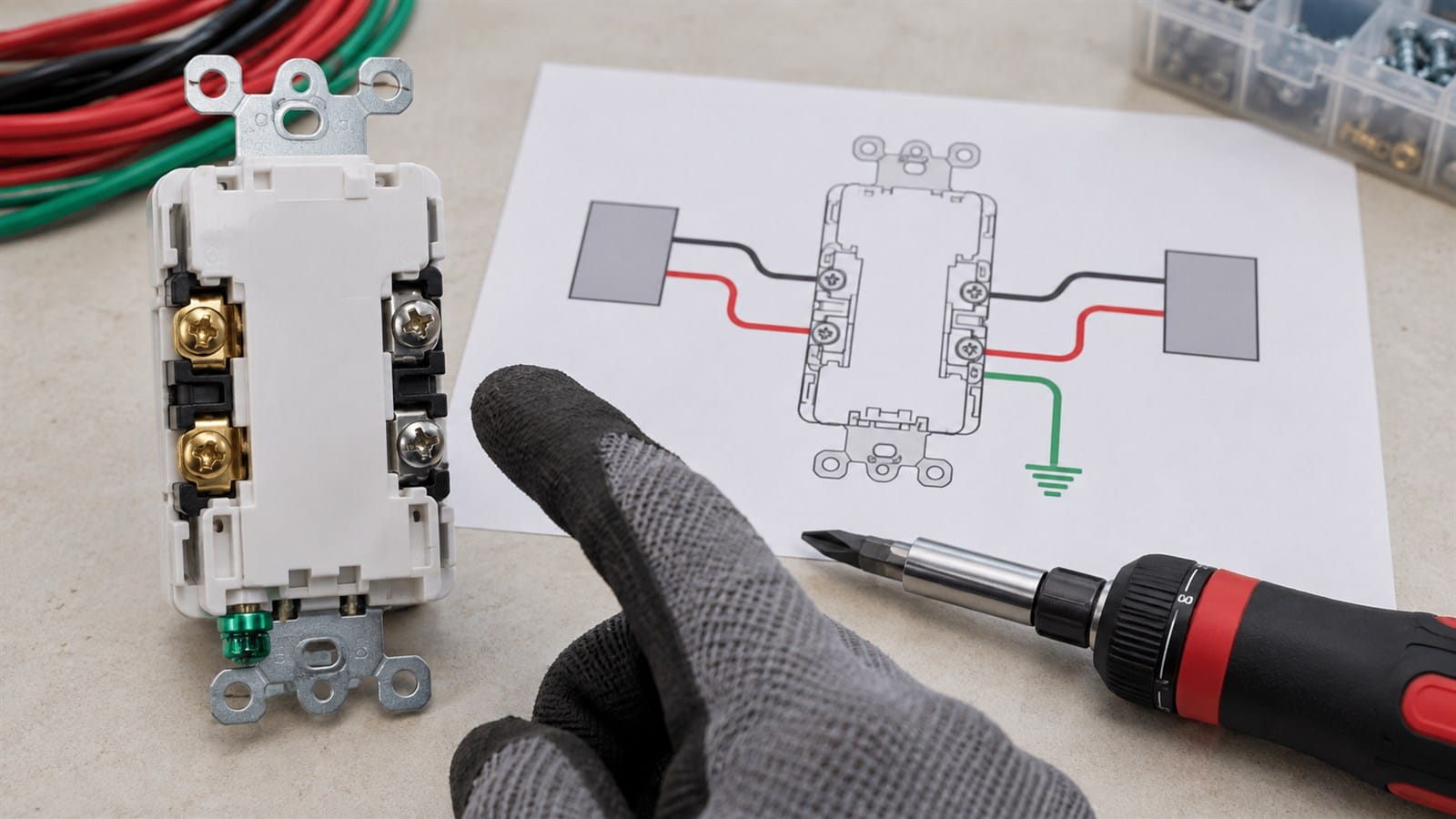
The exact terminal method, conductor range, strip length and torque belong in the approved instructions and submittal.
Check these fields:
- permitted conductor material, such as copper or copper-clad aluminum if specifically allowed;
- conductor size range;
- solid, stranded, or both;
- side-wire, back-wire clamp, or another connection method;
- LINE and LOAD terminal identification;
- strip length;
- terminal-screw torque;
- grounding-terminal requirements;
- number of conductors permitted per terminal;
- box depth and conductor-space implications.
Do not fill a blank datasheet field from another manufacturer’s instructions. Terminal geometry and torque are product-specific. Obtain the installation sheet for the exact model and check that the sample’s rear markings agree with it.
Faith’s GFCI LINE versus LOAD guide explains the functional difference, but the product instructions remain the controlling source for wiring the selected device.
Treat self-test and indicator claims as operating behavior
“Self-test,” “auto-monitoring,” “status indicator,” and “end-of-life” are not interchangeable marketing phrases. Ask the supplier to describe what the exact model does under normal operation and after it detects that protection is unavailable.
The controlled product documents should answer:
- What does each indicator color or state mean?
- What happens after initial energization?
- How frequently does the device perform its internal monitoring function?
- What happens if the device can no longer provide GFCI protection?
- Can the receptacle deliver power in that state?
- What manual test schedule does the manufacturer require?
Do not convert those answers into a universal claim for every GFCI. Behavior can differ by design and certification requirements. The U.S. Consumer Product Safety Commission advises users to test installed GFCIs after installation, at least monthly, after a power failure, and according to the manufacturer’s instructions. The final published article should preserve that manufacturer-instruction qualifier.
Verify certification independently
A datasheet logo is not the certification record. Before approving an order, search the current certification database and reconcile the result with the quote and sample.
UL Product iQ, for example, allows users to search certification information by company, model, file number and category control number. UL’s digital certification data may include the standard, category, model nomenclature, ratings and conditions of acceptability. UL also cautions that certification alone does not establish suitability for a specific end use.
Use this verification sequence:
- Search the legal company name shown in the claim.
- Search the file or listing number.
- Locate the product category and applicable standard.
- Confirm the exact model or permitted nomenclature.
- Compare ratings and descriptive fields with the datasheet.
- Compare the certification mark and identity with the physical sample and artwork.
- Save a dated approval note or permitted database extract in the project record.

A model-level database check should be completed before artwork or mass production is approved.
If the certification record cannot be found, pause approval and ask the supplier to clarify the company name, file number, model nomenclature and listing path. Do not substitute a certificate image, laboratory test report, business license or ISO certificate for a current product certification record.
Ongoing certification surveillance is also different from a one-time document check. UL describes Follow-Up Services as onsite inspections used to verify that currently manufactured certified products remain consistent with the construction originally evaluated. A buyer’s incoming and supplier-quality controls should complement that process, not claim to replace it.
Compare the datasheet with the physical sample
Create a sample reconciliation sheet with one row per controlled characteristic. Photograph the front, rear, sides, terminal areas, markings, included instructions, unit box and master carton. Record the sample date and model.
| Checkpoint | Datasheet | Certification record | Sample or packaging | Approval result |
|---|---|---|---|---|
| Model and brand identity | Exact catalog number | Covered nomenclature | Molded/printed identity | Match / hold |
| Electrical rating | Voltage, frequency, amperage | Applicable rating | Device marking | Match / hold |
| Terminals | Method and conductor range | As applicable | Rear layout and instructions | Match / hold |
| TR/WR or special grade | Explicit attribute | Covered construction | Marking and physical feature | Match / hold |
| Self-test behavior | Functional description | Applicable requirements | Instructions and powered sample | Match / hold |
| Dimensions | Drawing and tolerances | — | Measured sample | Match / hold |
| Package contents | Listed accessories | — | Box, plate, screws, manual | Match / hold |
Use “hold” for a blank or conflict. Do not let the commercial team turn “pending clarification” into an automatic pass because the shipment date is close.
Translate the specification into the purchase order
The final purchase description should be specific enough that receiving inspection can determine whether the shipment matches the approval.
Include, where applicable:
- manufacturer and exact catalog number;
- buyer SKU and approved brand identity;
- voltage, frequency, current and configuration;
- feed-through rating;
- TR, WR, grade and color requirements;
- terminal method and conductor limitations;
- approved certification identity and model coverage;
- controlled datasheet, instruction and artwork revisions;
- individual packaging, accessories and carton quantity;
- approved sample reference;
- batch code and record requirements;
- change-notification requirement;
- inspection plan and disposition process for nonconforming goods.
This is where a technical comparison becomes enforceable purchasing language. A quotation note that says only “same as sample” is weak unless the sample is identified, retained and connected to controlled documents.
Common red flags in a GFCI datasheet
One sheet covers every variant without a model matrix. The buyer cannot tell which rating, color or feature applies to the quote.
The certification logo is prominent but the file number and model identity are missing. Request searchable details and verify them independently.
Terminal torque or conductor range is absent. Obtain the exact installation instructions before evaluating labor, compatibility or safety.
The sheet says “UL/ETL approved.” Ask which NRTL, which mark, which standard, which company, which file, and which model. OSHA recognizes individual NRTLs; “NRTL” is not a universal product mark.
The product photo and drawing show different rear layouts. Hold the sample approval until the controlled configuration is clear.
The supplier changes a component, housing, terminal or label after sample approval. Require formal change review and confirm whether certification-body authorization is needed.
The datasheet claims suitability for every application. Product certification and ratings do not replace the adopted electrical code, project specification, installation instructions or AHJ decision.
A six-step buyer workflow
- Define the application, electrical rating, environmental attributes and commercial configuration.
- Obtain the exact-model datasheet, instructions, certification identity and model matrix.
- Verify the certification record in the issuing organization’s current database.
- Reconcile the documents with a representative sample and packaging set.
- Put the controlled revisions and acceptance criteria into the purchase order.
- Check incoming goods and retain the batch record before releasing inventory.
For a broader supplier-level review, use Faith’s 12-point GFCI manufacturer checklist. For rating selection, see 15-amp versus 20-amp GFCI outlets.
Frequently asked questions
Is a GFCI specification sheet proof that the product is listed?
No. It is a supplier-controlled product document. Verify the exact company, model, category, rating and certification identity in the certification body’s current database.
Can two models share one GFCI datasheet?
Yes, but the document should include a clear model matrix showing which ratings, colors, features and packaging options apply to each model. The quoted SKU must map to one unambiguous configuration.
What should a buyer do when the sample and datasheet disagree?
Place the approval on hold. Ask the supplier to correct the document or replace the sample, identify the controlled configuration, and explain whether any certification or artwork records are affected.
Does a certification record mean the product is suitable for my project?
Not by itself. Certification scope, electrical ratings, code requirements, environmental conditions, installation instructions and the project specification all need to align.
Request a document-matched quotation
When requesting a GFCI quotation, send the target rating, configuration, TR/WR requirements, color, packaging, certification path and expected quantity. Ask the supplier to return the exact-model datasheet, installation instructions, searchable certification information and sample plan with the quote.
Contact Faith Electric to request specifications and discuss a model-matched OEM or distribution inquiry. Buyers should independently verify the final certification record and installation requirements before approval.
Sources
- UL Standards & Engagement — UL 943, Standard for Ground-Fault Circuit-Interrupters
- UL Solutions — GFCI Personal Protection Devices Testing and Certification
- UL Solutions — Product Sourcing and Certifications Database (Product iQ)
- UL Solutions — Digital Marketplace: UL Certification Data
- UL Solutions — Follow-Up Services
- OSHA — Nationally Recognized Testing Laboratory Program FAQs
- U.S. Consumer Product Safety Commission — GFCI Fact Sheet
Procurement and safety note: This article is a document-review framework, not installation instructions, a certification decision, or legal advice. Use the exact product instructions and certification record, the adopted code, the project documents, and qualified professionals for the final application.